
XLeRobot
Dual SO-101 arms, pan-tilt head and a servo-driven base built into an IKEA cart.
- $660Basic build (use your laptop, single RGB head cam), excluding 3D printing, tools, shipping and taxes; upgrades +30 USD stereo head cam, +79 USD Raspberry Pi, +220 USD RealSense head cam; EU ~680 EUR, CN ~3999 CNY, IN ~87000 INR; the priced BOM rows describe the 3-omni-wheel base, not the 0.4.0 dual-wheel base, estimate
- 16 DoF
- Apache-2.0hardware
- 89 / 100 reproducibilityStrong source coverage, unverified
What it is
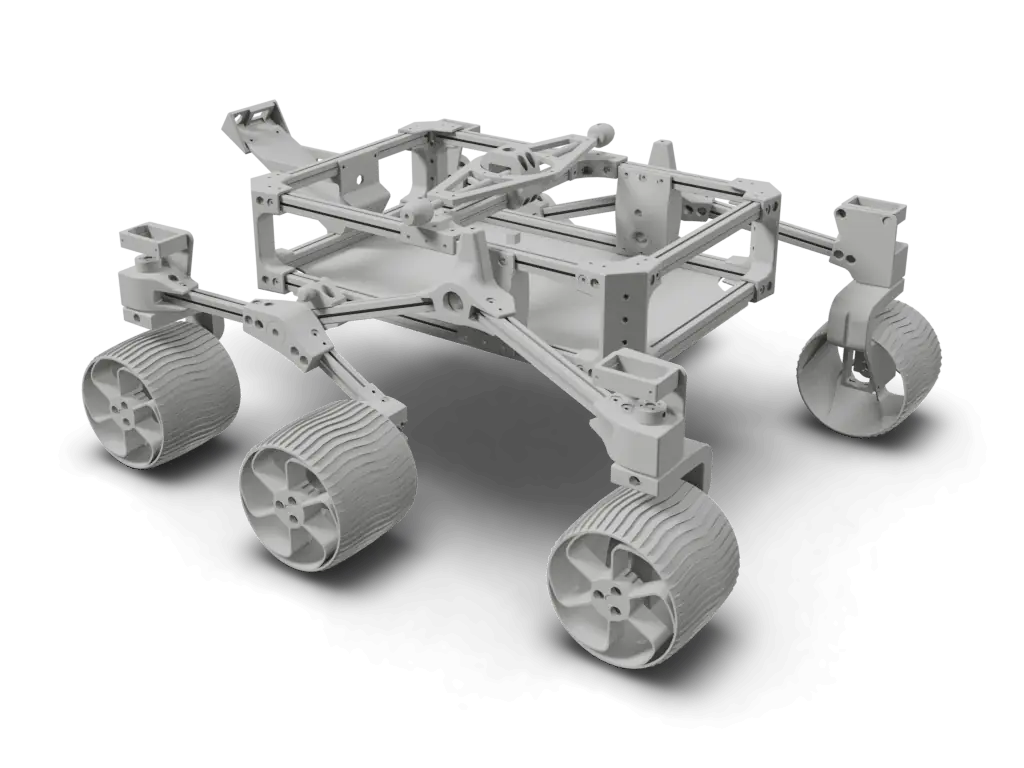
XLeRobot is Gaotian (Vector) Wang's open dual-arm mobile home robot: two SO-101 follower arms, a two-servo pan/tilt head and a Feetech-servo drive base mounted in an IKEA RÅSKOG utility cart, powered by a USB-C power station. The current hardware is 0.4.0 (dual-wheel differential base, modular arm base), which follows the 0.2.0 and 0.3.0 builds on a three-omni-wheel LeKiwi-style base. The repo holds 0.4.0 STEP files, a 3MF print file and STLs, ManiSkill URDF and MuJoCo MJCF models, and LeRobot-based robot classes with keyboard, Xbox, Joy-Con and VR teleop examples; the repo is Apache-2.0 and its XLeVR subfolder is MIT. The priced BOM and the ~$660 Basic estimate on the docs site describe the earlier three-omni-wheel build and exclude 3D printing, tools, shipping and taxes. The 3D view is the project's ManiSkill simulation model, which shows the cart, arms and head in the 0.3.0 layout without the drive base.
Licenses
- Hardware
- Apache-2.0
- Software
- Apache-2.0
- Docs
- Not published
Degrees of freedom
16 DoF arm 10head 2wheels 2gripper 2
Mobile manipulatorBimanualDifferential drivePan tilt headsource
Auto-assembled, not yet reviewed
Source record
- Source
- 5.6k stars, last push 2026-09-24
- HW license
- Apache-2.0
- Cost
- $660estimate, Basic build (use your laptop, single RGB head cam), excluding 3D printing, tools, shipping and taxes; upgrades +30 USD stereo head cam, +79 USD Raspberry Pi, +220 USD RealSense head cam; EU ~680 EUR, CN ~3999 CNY, IN ~87000 INR; the priced BOM rows describe the 3-omni-wheel base, not the 0.4.0 dual-wheel base
- Lifecycle
- Active
- Engine
- v3.1.1
- Checked
- Model
- xlerobot.urdf@749abc8the project's simulation model in Vector-Wangel/XLeRobot, not its build CADrendered 2026-10-02
Maintain XLeRobot? Claim this page to correct it.
Parts and cost
Cost to build
- Basic build (use your laptop, single RGB head cam), excluding 3D printing, tools, shipping and taxes; upgrades +30 USD stereo head cam, +79 USD Raspberry Pi, +220 USD RealSense head cam; EU ~680 EUR, CN ~3999 CNY, IN ~87000 INR; the priced BOM rows describe the 3-omni-wheel base, not the 0.4.0 dual-wheel base
In the source currency, as read on 2026-09-30. Not converted, and not checked against current vendor prices: none of these is a Motari-verified checkout total.
XLeRobot parts, as the source lists them. Prices are the source's, not checked against vendors.
| Part | Qty | Spec | Source | Confidence |
|---|---|---|---|---|
STS3215 Servo (12V)17 motors = 12 for arms + 3 for base + 2 for head on the omni-wheel base; the 0.4.0 dual-wheel servo base drives 2 wheels, so 16 in total per the xlerobot_2wheels robot class | 17 | Feetech STS3215, 12V version only | Wowrobo$14 eachVector-Wangel/XLeRobot docs/en/source/hardware/getting_started/material.md line 48 | high |
IKEA RÅSKOG Utility cartChassis for both arms, head, base and battery | 1 | IKEA RÅSKOG utility cart | IKEA$39.99Vector-Wangel/XLeRobot docs/en/source/hardware/getting_started/material.md line 49 | high |
Anker SOLIX C300 Power StationAny battery with two 60W+ USB-C fast-charge ports should work per upstream (untested alternatives listed) | 1 | 288Wh, 300W max output | Anker$179.99Vector-Wangel/XLeRobot docs/en/source/hardware/getting_started/material.md line 50 | high |
4" Omni wheelsOmni-wheel base (0.3.0 layout); the 0.4.0 dual-wheel base uses walker wheels instead | 3 | 4 inch omni wheel | VEX Robotics$9.99 eachVector-Wangel/XLeRobot docs/en/source/hardware/getting_started/material.md line 51 | high |
| 1 | 4-piece table clamp set | Amazon$8.99Vector-Wangel/XLeRobot docs/en/source/hardware/getting_started/material.md line 52 | high | |
Raspberry Pi 5 (Optional)Optional; upstream says a laptop can run XLeRobot directly | 1 | Raspberry Pi 5 | Adafruit$60.00Vector-Wangel/XLeRobot docs/en/source/hardware/getting_started/material.md line 71 | high |
Motor Control BoardOne per servo bus (left arm + head, right arm + base) | 2 | servo control board (source links a Waveshare listing) | Amazon$10.55 eachVector-Wangel/XLeRobot docs/en/source/hardware/getting_started/material.md line 72 | high |
| 1 | microSD card | Amazon$11.23Vector-Wangel/XLeRobot docs/en/source/hardware/getting_started/material.md line 73 | high | |
USB-C to USB-A Cable 2 pcsMotor control boards to Raspberry Pi or PC | 1 | 2-cable pack | Amazon$8.99Vector-Wangel/XLeRobot docs/en/source/hardware/getting_started/material.md line 74 | high |
USB-C Cable 2 pcsRaspberry Pi to the battery | 1 | 2-cable pack, fast-charging type | Amazon$8.99Vector-Wangel/XLeRobot docs/en/source/hardware/getting_started/material.md line 75 | high |
| 1 | USB hub | Amazon$15.99Vector-Wangel/XLeRobot docs/en/source/hardware/getting_started/material.md line 76 | high | |
4ft 5264 wiresUS buyers get connector kits and extend the servo cable themselves | 1 | 5264 connector servo wire | Amazon$21.99Vector-Wangel/XLeRobot docs/en/source/hardware/getting_started/material.md line 77 | high |
Type C to DC wire(12V)Connect the two motor control boards to the power station | 2 | USB-C to 12V DC cable | Amazon$8.99 eachVector-Wangel/XLeRobot docs/en/source/hardware/getting_started/material.md line 78 | high |
Hand cameraWrist cameras on the two arms | 2 | USB camera | Amazon$12.98 eachVector-Wangel/XLeRobot docs/en/source/hardware/getting_started/material.md line 93 | high |
| 1 | Logitech C920 webcam | Amazon$66Vector-Wangel/XLeRobot docs/en/source/hardware/getting_started/material.md line 94 | high | |
RealSense D415 (Optional for Pro)Optional RGBD head camera | 1 | Intel RealSense D415 | Intel$272Vector-Wangel/XLeRobot docs/en/source/hardware/getting_started/material.md line 95 | high |
M3 Screws and Nuts Set (come with the L-shape screw driver)Assembly Tools section, excluded from the ~$660 total; upstream also needs 9x M4x10 screws for the wheels | 1 | M3 screw and nut assortment | Amazon$14.99Vector-Wangel/XLeRobot docs/en/source/hardware/getting_started/material.md line 36 | high |
Flush cutterAssembly Tools section; used to cut the cart's metal mesh for cable routing | 1 | flush cutter | Amazon$6.99Vector-Wangel/XLeRobot docs/en/source/hardware/getting_started/material.md line 37 | high |
Screwdriver SetAssembly Tools section | 1 | precision screwdriver set | Amazon$6Vector-Wangel/XLeRobot docs/en/source/hardware/getting_started/material.md line 38 | high |
Dual-wheel base parts (0.4.0)Listed on the dual-wheel assembly page besides printed parts and servo motors; quantities not stated upstream | 1 | Universal walker wheels (5 inches), 30 x 37 x 4mm bearings, longer motor cables (or extension kit) | not listed in source BOMnot listed in source BOMVector-Wangel/XLeRobot docs/en/source/hardware/getting_started/assemble_2wheel.md lines 45-49 | high |
3D-printed partsTwo SO101 follower arms plus arm base, neck, head and base connectors; excluded from the ~$660 total | 1 | PLA, printed upstream on a Bambu Lab A1; soft fin-ray fingers in TPU95A | 3D print yourselffilament about $15 to $25 per upstream 3D printing pageVector-Wangel/XLeRobot docs/en/source/hardware/getting_started/3d.md lines 15-23 | high |
Rows from the source's own parts list 18
docs/en/source/hardware/getting_started/material.md@749abc8markdown
| Source row | Qty | Price and vendor | Line |
|---|---|---|---|
Basic (use your laptop, single RGB head cam) | vendor not listedBasic (use your laptop, single RGB head cam) | L11 | |
↑ Stereo dual-eye RGB head cam | vendor not listed↑ Stereo dual-eye RGB head cam | L12 | |
+ RaspberryPi | vendor not listed+ RaspberryPi | L13 | |
↑ RealSense RGBD head cam | vendor not listed↑ RealSense RGBD head cam | L14 | |
M3 Screws and Nuts Set (come with the L-shape screw driver) | 1 | L36 | |
Flush cutter | 1 | L37 | |
Screwdriver Set | 1 | L38 | |
STS3215 Servo (12V) | 17 | L48 |
10 more rows in docs/en/source/hardware/getting_started/material.md
How to build
Steps marked Motari summary condense the linked source; follow the source for exact instructions. Upstream step marks a step taken from the linked guide.
Source the parts
Buy the parts on the docs-site bill of materials: 12V STS3215 servos, an IKEA RÅSKOG cart, an Anker SOLIX C300 power station (or any battery with two 60W+ USB-C fast-charge ports), two motor control boards, cables and cameras. The 0.4.0 dual-wheel base also needs 5 inch universal walker wheels, 30 x 37 x 4mm bearings and longer motor cables.
Motari summaryxlerobot.readthedocs.io/en/latest/hardware/getting_started/m...Print the parts
Print two SO101 follower arms plus the XLeRobot arm base, neck, head and base connectors (3MF for 0.3.0, XLeRobot_0_4_0_extra.stl for the dual-wheel base). Upstream printed in PLA on a Bambu Lab A1; the 3MF only stores models, so orient parts and add supports yourself. The soft fin-ray fingers need TPU95A.
Motari summaryxlerobot.readthedocs.io/en/latest/hardware/getting_started/3...Build the arms and set motor IDs
Build two identical SO101 follower arms with the LeRobot SO101 guide, each with motor IDs 1 to 6 on its own control board. Then set the extra motor IDs one at a time with the Bambot web tool: 7 and 8 for the head, and the wheel motor IDs for the base.
Upstream stepxlerobot.readthedocs.io/en/latest/hardware/getting_started/a...Mount the base under the cart
Mount the wheel motors and wheels on the base plate, fit the printed connectors and bolt the base under the IKEA cart, cutting out only the central x of the cart's metal mesh at the base holes for cable routing. The 0.4.0 dual-wheel page shows the servo walker-wheel base; the brushless option was still marked as coming soon.
Motari summaryxlerobot.readthedocs.io/en/latest/hardware/getting_started/a...Assemble the top base, head and wiring
Assemble the top base and the head (built like the first two steps of SO101 arm assembly). Connect the extended 5264 motor cable from the Lekiwi base to one of the SO101 arms, connect both motor control boards to the Raspberry Pi with USB-C to USB-A data cables, and plug the two USB-C to 12V DC cables and the Pi's USB-C cable into the fast charging section of the power supply, connecting the power cables last.
Upstream stepxlerobot.readthedocs.io/en/latest/hardware/getting_started/a...Install software and teleoperate
Install LeRobot, copy the XLeRobot robot folder, IK model and example scripts into it, then run the keyboard, Xbox or Joy-Con teleop examples to drive the arms, head and base.
Motari summaryxlerobot.readthedocs.io/en/latest/software/getting_started/i...
Wiring, power and firmware are safety-relevant and shown for reference only. Check them against the source before building.
metCAD / mesh present24 editable CAD files (SLDPRT/STEP), including an assembly + 159 mesh files20/20
metBOM evidenceReviewedThe BOM tables list parts with amounts, unit prices in four currencies and buy links. The ~660 USD total prices the earlier three-omni-wheel base, not the 0.4.0 build, so it is not counted.20/20
Quality tier 4 of 5
Reviewed override, 2026-10-02
Evidence on github.comEngine alone: partial at tier 1 (BOM on xlerobot.readthedocs.io, not inspected by the engine)
metWiring diagramReviewedThe guide's Wiring section embeds a drawn diagram of the motor, power, data and camera cables (on the omni-wheel build). It is an untitled GitHub attachment, so the engine read the section as text only.15/15
Quality tier 2 of 3
Reviewed override, 2026-10-02
Evidence on github.comEngine alone: partial at tier 1 (wiring described in text only, no diagram)
metFirmware linkedcontrol software linked (software source Vector-Wangel/XLeRobot)10/10
Quality tier 2 of 3
metBuild instructionsstep-by-step guide with images15/15
Quality tier 2 of 3
metOSHW-compatible licenseApache-2.0 (from repository license)10/10
Quality tier 2 of 2
- LICENSE749abc8
missingKnown reproductionsno verified builds yet0/10
Quality tier 0 of 2
Only build reports a maintainer or admin has reviewed count here.
Capped at 89: the criteria add up to 90, and a score of 90 or more needs a reviewed build.
Engine v3.1.1 at 749abc8, 2 items reviewed by hand
How this score is computedFiles and sim
- hardware/step/XLeRobot_040/XLeRobot040_armbase.step
- hardware/step/XLeRobot_040/XLeRobot040_dualwheelbase.step
- hardware/step/XLeRobot_040/XLeRobot040_neck_refined.step
- hardware/XLeRobot_0_4_0_extra.stl
- hardware/XLeRobot_0_3_0.3mf
- hardware/Ender_Follower_SO101.stl
- simulation/Maniskill/assets/xlerobot/xlerobot.urdf
- simulation/xlerobot_urdf.zip
- simulation/mujoco/xlerobot.xml
- docs/en/source/hardware/getting_started/material.md
- docs/en/source/hardware/getting_started/assemble.md
- docs/en/source/hardware/getting_started/assemble_2wheel.md
- software/src/robots/xlerobot_2wheels/xlerobot_2wheels.py
- software/src/robots/xlerobot/xlerobot.py
Files stay in the upstream repository under their own licenses; these links open them there. The 3D model on this page is Motari's conversion of the file named under Simulation.
Simulation
Robot description files a simulator or CAD tool can load, linked at the commit they were found.
- URDFsimulation/Maniskill/assets/xlerobot/xlerobot.urdfVector-Wangel/XLeRobot
- URDFsimulation/Maniskill/assets/xlerobot/xlerobot_front.urdfVector-Wangel/XLeRobot
The 3D specimen on this page is converted from simulation/Maniskill/assets/xlerobot/xlerobot.urdf at 749abc8, the project's simulation model in Vector-Wangel/XLeRobot, not its build CAD.
Builds
No reviewed builds of XLeRobot yet.
A build log records the evidence (photos, a video, your repository), what the build cost, how long it took and what you changed. Each one is checked by Motari (until a maintainer claims this page) before it shows here, and reviewed builds count toward the reproducibility score.
Sources
Where the facts come from
- Hardwaregithub.com/Vector-Wangel/XLeRobot749abc8
- Documentationxlerobot.readthedocs.io/en/latest/index.html
- Bill of materialsxlerobot.readthedocs.io/en/latest/hardware/getting_started/m...
- Build guidexlerobot.readthedocs.io/en/latest/hardware/getting_started/a...
- Build guidexlerobot.readthedocs.io/en/latest/hardware/getting_started/a...
- Softwaregithub.com/Vector-Wangel/XLeRobot/tree/main/software749abc8
- Simulationgithub.com/Vector-Wangel/XLeRobot/tree/main/simulation749abc8
- Storeshop.wowrobo.com/products/xlerobot-dual-arm-mobile-household...
Last push to Vector-Wangel/XLeRobot: 2026-09-24 (checked 2026-10-02)
Related links
- LeRobot integrationInstall LeRobot and move XLeRobot files
- Arm designTheRobotStudio/SO-ARM100 (SO-101)
How this page was made
Assembled from public sources on 2026-09-30, not yet reviewed by the maintainer. Each figure links to where it is stated; a value the sources do not state reads "not published". Last source review: 2026-09-30 Vector-Wangel/XLeRobot@749abc8 README, LICENSE, tree.
Original files stay intact and separately licensed; Motari adds only the summary on this page. Maintainer? Request a correction or removal.
Robots like XLeRobot
Shares parts with
Robots whose bill of materials names the same parts, most shared first. Each part links to every robot that uses it.
- AlohaMiniRaspberry PiSTS321583
- LeKiwiRaspberry PiSTS321580
- Open Duck MiniRaspberry PiSTS321563
- JPL Open Source RoverRaspberry Pi89
- SO-101STS321583
- SO-ARM100 / SO-ARM101 (Standard Open Arm)STS321583
Parts in this robot's BOM: Raspberry Pi (25 other robots), Feetech STS3215 servo (10 other robots)
Similar robots
The same type of robot, closest first by body plan, published cost and degrees of freedom. All mobile robots


Badge for the README
Maintain XLeRobot? Show its reproducibility score in the project's README. The badge links back to this page and updates with the score.
%22%3E%0A%20%20%20%20%3Crect%20width%3D%22108%22%20height%3D%2220%22%20fill%3D%22%23555%22%2F%3E%0A%20%20%20%20%3Crect%20x%3D%22108%22%20width%3D%2249%22%20height%3D%2220%22%20fill%3D%22%232ea44f%22%2F%3E%0A%20%20%20%20%3Crect%20width%3D%22157%22%20height%3D%2220%22%20fill%3D%22url(%23s)%22%2F%3E%0A%20%20%3C%2Fg%3E%0A%20%20%3Cg%20fill%3D%22%23fff%22%20text-anchor%3D%22middle%22%20font-family%3D%22Verdana%2CGeneva%2CDejaVu%20Sans%2Csans-serif%22%20font-size%3D%22110%22%20text-rendering%3D%22geometricPrecision%22%3E%0A%20%20%20%20%3Ctext%20aria-hidden%3D%22true%22%20x%3D%22540%22%20y%3D%22150%22%20fill%3D%22%23010101%22%20fill-opacity%3D%22.3%22%20transform%3D%22scale(.1)%22%20textLength%3D%22980%22%3Ereproducibility%3C%2Ftext%3E%0A%20%20%20%20%3Ctext%20x%3D%22540%22%20y%3D%22140%22%20transform%3D%22scale(.1)%22%20textLength%3D%22980%22%3Ereproducibility%3C%2Ftext%3E%0A%20%20%20%20%3Ctext%20aria-hidden%3D%22true%22%20x%3D%221325%22%20y%3D%22150%22%20fill%3D%22%23010101%22%20fill-opacity%3D%22.3%22%20transform%3D%22scale(.1)%22%20textLength%3D%22390%22%3E89%2F100%3C%2Ftext%3E%0A%20%20%20%20%3Ctext%20x%3D%221325%22%20y%3D%22140%22%20transform%3D%22scale(.1)%22%20textLength%3D%22390%22%3E89%2F100%3C%2Ftext%3E%0A%20%20%3C%2Fg%3E%0A%20%20%3C%2Fa%3E%0A%3C%2Fsvg%3E)
[](https://motari.io/r/xlerobot)<a href="https://motari.io/r/xlerobot"><img src="https://motari.io/api/v1/badge/xlerobot" alt="Motari reproducibility score for XLeRobot" height="20"></a>A score of 90 or more needs a reviewed build. How the score is computed